Exporting Recruits to Excel Topic

Has anybody figured out how to copy the 3.0 recruits into an excel workbook to sort offline? When I paste them in, the rows are pretty wonky.
9/27/2016 9:44 AM
Not sure if this is your issue or not

They changed the formatting with 3.0. Whenever you try to copy and paste anything (recruit ratings in recruit pool, game logs, your own player stats, etc) you can't copy the entire name and stats together. You need to highlight all the names individually and copy/paste those. Then copy and paste all the stats next to the names in excel.

If that isn't your issue, can you post a screenshot of what is wonky? I do it all the time so I can help you figure it out.
9/27/2016 10:15 AM
You have to do it in two parts ... names and 'everything else' (as Benis said)

Also .. if you get checkboxes (objects, pictures) and you want them to go away see this link

9/27/2016 10:48 AM
The copy and paste works fine when you pull the recruits with only their rating attributes over. My concern is when you bring over the preference attributes.



When copied into Excel, it looks like this:
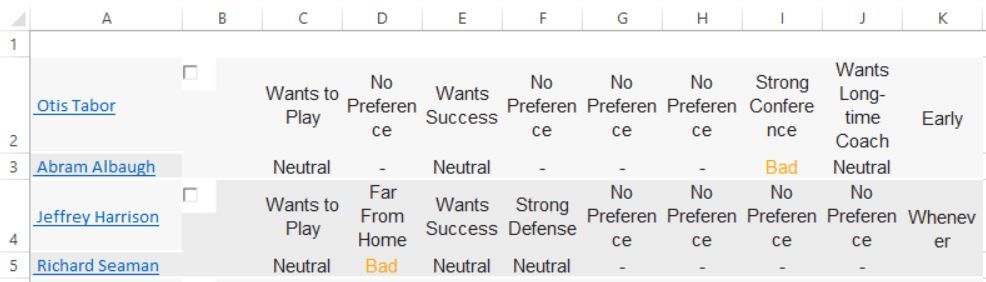


It looks to be adding an additional row when a player has a specific preference (Very good, good, neutral, bad), and it throws off the whole spreadsheet. Any thoughts? Thanks in advance!
9/27/2016 5:26 PM (edited)
Ah yeah I know what you mean. I had to deal with that when I did the data analysis for preferences. When I'm on my computer I'll show you.
9/27/2016 5:50 PM
Sweet...any help would be great!
9/27/2016 6:27 PM
Okay man, I got a workaround for you, a little bit of fiddling around but it gets the job done. I'm assuming what you'd like to do is just take the recruits name and then the Very Good, Bad, neutral etc information and delete the first row of information the comes up (wants to play, near from home etc) right?

1. Copy and paste just the preferences into an excel sheet. Leave the first column blank.
2. The headings are white text in the webpage so it will look blank. So change text color.
3. The headers are misaligned by 1 column. So insert a cell to move the headers to the right one spot or copy and post headers to move them over.
4. You can do the thing hughes suggests or you can now copy the selection starting with the first column of preferences and paste into another tab.This gets rid of the those little selection boxes.
5. Add filters to the headers. Filter to show the wants to play and no preference in the first column. Delete those rows.
6. Now clear out the filter and everything remaining is either a - or a preference value of good, bad etc. - means they ahd no preference. So basically neutral.
7. Just now copy and paste the names of the recruits next to the preferences. Add color to heading font again.

FYI- this is just if you select the first 25 recruits of the page. If you select more, there will be a gap in between each 25 recruits. so you'll have to delete that row.

Someone else might have an easier way to do it but this way isn't too much work. Let me know if this helps.
9/27/2016 7:17 PM
Exporting Recruits to Excel Topic

Search Criteria

Terms of Use Customer Support Privacy Statement

© 1999-2026 WhatIfSports.com, Inc. All rights reserved. WhatIfSports is a trademark of WhatIfSports.com, Inc. SimLeague, SimMatchup and iSimNow are trademarks or registered trademarks of Electronic Arts, Inc. Used under license. The names of actual companies and products mentioned herein may be the trademarks of their respective owners.